
How to Start a Digital Products Business: A Beginner’s Guide
As a creator, solopreneur, or someone just starting out online, digital products can be the bridge between sharing what you know and building a steady income stream over time.
This guide walks you through the process of creating, launching, and growing a digital product business, using the audience you already own – or the one you’re now building.
What’s a Digital Product?
Briefly, a digital product is any valuable asset that is delivered electronically, for example, this could be an eBook, a PDF guide, a spreadsheet template, a short video course, a Notion workspace, printable art, a paid newsletter, or a collection of email templates.
One of the advantages of a digital product is that you can create it once and sell it repeatedly, with zero or low additional cost.
For the solo creator, in particular, this means:
• High profit margins (no manufacturing, and zero shipping costs)
• Total location freedom (automated delivery)
• An asset that you will own forever (in contrast to revenue from advertisements or social platform payouts)
• Scaled impact (with the same effort you could assist 10 or 10,000 individuals)
Research Your First Product Idea
One of the biggest mistake beginners make is trying to build a massive course or attempting to sell too many digital products in one go. Yes, at this stage, we even believe the way to go is to create a comprehensive collection of digital products.
Don’t try to create products in every possible category. Start with a micro-product, for example, an $8–$49 solution to a single, specific problem that you already help people to solve.
Here are some sources that you could use for ideas:
• Think about your own learning journey: What did you teach yourself that others consistently ask you to explain?
• How about a process you’ve streamlined? Maybe you have a project planning template or a client onboarding checklist that you use daily.
• “Done-with-you” becomes “done-for-you”: If you’ve ever walked someone through a process, you can now turn that into a standalone guide or template.
• Get ideas from recurring questions that you receive in your email replies, comments, or community.
Now, test your idea with this one-sentence formula:
“I help [specific person] achieve [specific outcome] by giving them [specific digital tool].”
Validate Before You Build
It is not always necessary to create the whole product to know if it will sell. Follow these three low-lift validation methods:
- The teaser email: Write a quick, personal email to your list (even 50 people are good enough) describing the problem and asking: “I’m considering creating a step-by-step guide on this (whatever the topic may be). Would you pay $20 for it?” Send them to a one-question Typeform (software tool used to create surveys, etc.) or just ask them to reply. By doing this, you will be able to determine if there is genuine interest among your audience.
- The pre-sell: The second validation method is the pre-sell, where you describe the product on a simple sales page and accept payments before you create it. A small discount could be offered to early buyers. In any case, if no one buys, you would save valuable hours of creation time.
- The free workshop test: In this case, you could host, for example, a live 40-minute tutorial teaching the core concept. Ask attendees to pay for the refined, organized version, along with bonuses. Observe who stays, and who actually asks for the product.
Bear in mind that validation is not about asking friends if your idea is good; it’s about seeking even a small commitment from your audience.
Create Your First Product
Choose a simple format based on your strengths and research:
• If you’re a writer you could create a short eBook, guide, or fill-in-the-blank workbook.
• If you have been using certain tools to organize your work, you could build a template using tools such as Notion, Google Sheets, Airtable, or Canva.
• What about teaching? Well, you could record a mini video course, maybe 3-5 short lessons on Loom or Zoom, bundled with a PDF summary.
• If you’re into design, you could offer a set of templates, presets, printable art, etc.
• If you’re a coach or consultant you could create, for example, a self-paced audio guide or a set of decision-making frameworks.
Whatever your role may be, there is always something that you can create to solve someone’s problem – no need for over thinking.
The Digital Product Creation Blueprint:
• Solve one problem: List the 3-5 steps or sections. Remove everything that doesn’t serve that one outcome.
• Don’t prolong the product creation process, trying to achieve perfection. Write or record in a weekend. Your first digital product should be useful and of relatively high quality, but it doesn’t need to be a masterpiece.
Price with Confidence
Even the experienced digital entrepreneurs sometimes face uncertainties when pricing a digital product.
As a beginner, resist the temptation to under charge, thinking that people will run to buy from you instead of your competitors. Price your product based on the transformation that it provides, not the file size.
• Now, think about this – if a $15 template saves someone five hours of work, wouldn’t that be a bargain?
• If a $50 mini-course lands a client a $1,000 gig wouldn’t that be a big benefit?
Start with a price that is not too high or too low, probably in the $9-$49 range or so. What you’re trying to achieve is an accessible trust-building price, as a beginner. Later, you can always create more advanced products and raise your prices.
Set Up a Simple Sales System
For now, forget about the complicated sales funnels you may be advised to set up online. Instead, you can set up a quiet, effective sales system with three parts:
- A dedicated landing page (or section of your website)
• A headline that names the outcome.
• A short description of what’s inside.
• A clear “What’s in it for you” bullet list.
• A buy button.
A testimonial or two is usually suggested, but this may not be possible for all beginners. If that is the case still continue, while building your audience and your email list.
Tools
Examples of tools that you could use to set up your sales system include: Gumroad, Payhip, ThriveCart, Lemon Squeezy, or even a simple payment link from one of the platforms similar to Stripe, with a thank-you page that delivers the file. - A delivery mechanism
The best method to set up a quiet, effective sales system is through automatic delivery via the payment platform. A “thank you” page with the download link and an email address with the same link would cover all bases. - A gentle post-purchase email sequence
The third aspect of the sales system involves sending an email immediately with the product. A few days or so later, you could send another email asking how it’s going, and softly inviting your audience to share feedback or tag you if they post about it.
Launch to an Audience You Own
Now, this is where your audience-building work can really pay off. Make use of your email list, your blog (if you have one), podcast, or your presence in niche communities.
A quiet launch sequence might be as follows:
• Pre-launch (1–2 weeks): During this stage, you could share a story about your experience with the particular problem. Inform your audience about what you’re working on, and if possible, you could send them a survey or a teaser email.
• Launch week:
o Email 1: The story, the solution, the offer, which should be direct, warm, and with no hype.
o Email 2 (2–3 days later): A deeper dive into what’s inside, perhaps a behind-the-scenes look, or an early buyer’s quick win, if you prefer.
o Email 3 (before cart close or just as a final nudge): “Last chance” if you’re using a launch window or a simple “Here’s who this is really for” email.
Ongoing evergreen sales: Write a detailed blog post that naturally mentions the product as the solution to a problem. Link the post to the sales page. Keep your product in your email signature and your site’s “Resources” page (if you have one).
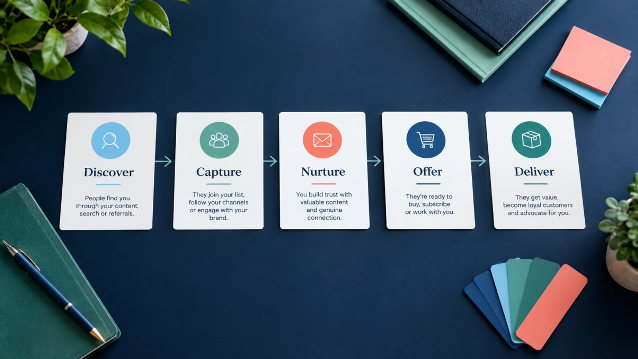
Nurture, Improve, and Expand
After launching, continue the efforts to build your digital products business.
Feedback
Find out from buyers what worked and what was missing. For this, you could use a simple Google Form, or a similar tool.
Involve your audience
Update the product based on the feedback. Let your audience know what you are doing, which shows that you care about their inputs, while building loyalty.
Bundle and expand
Bundling is a strategy that involves combining two or more related products into a discounted bundle.
In addition, you could create an advanced version of your product for those who want the next step.
Some Common Beginner Mistakes
Not Sharing
Share what you’re doing with your audience. Allow them to contribute -bring them along with you.
Perfection
We all want to do our best and to create the highest quality products possible. However, trying to achieve perfection can delay you for days or months, causing you to lose sales and audience interest. Create and launch your product as quickly as possible. Later, you can upgrade it, with buyer input.
Creating a product nobody wants
Do your research. Always remember to validate. Even a few “yes” replies can make a difference and prevent you from wasting valuable time.
No compelling description
Always remember to list the benefits of the product, not just the features. What can potential purchasers do now that they couldn’t before?
Setting it and forgetting it
New subscribers won’t necessarily know that your product exists unless you make the effort to promote it beyond your existing subscribers. So, don’t just “create and forget it”; promote your product periodically.
Your First 30-Day Digital Product Launch Plan
- Days 1–5: Brainstorm three specific problems being experienced by your audience. Choose one and write your one-sentence product promise.
- Days 6–10: Validate the idea with a short email or a conversation with 5-10 people. Outline your product on a single page.
- Days 11–20: Create the product, but keep it simple. For example, you could create something such as a PDF workbook, a Notion template, or a video series. Next, set up a sales page on Gumroad or a similar platform.
- Days 21–25: Send a pre-launch email to your list (or share in your community) mentioning the solution. Gather early feedback and one testimonial (if possible) from someone trustworthy.
- Days 26–30: It’s now time to launch. Send 2-3 warm, story-driven emails to your list. Share a related blog post highlighting the usefulness of the product, including a call-to-action.
Build, Share & Grow
A digital product business is not as difficult as you may have originally thought. With this guide, you can start building, sharing, and growing your digital product business, one step at a time.